Avoid the autocomplete pause
I assume you’ve heard about coding copilots, know what they are, and have probably used one. If you don’t, it’s usually an extension to your IDE of choice that autocompletes your code to make you more productive. While this sounds (and is) great, there are some potential drawbacks to be aware of, which we’ll discuss later in this article.
Why would I use a copilot?
Personally, I optimize for speed & momentum. I am at my peak productivity when I can sit for long hours, distraction-free, and get momentum. This is a great flow state that takes a while to get into. In general, I try to adopt tools to streamline my workflow so I can stay longer in the flow and maintain momentum. Copilots are one such tool that can help tremendously with that.
Copilots amplify my momentum and make the process a whole lot faster, which is why I find them such great tools. However, they amplify the momentum in whatever the current direction is. They can either be a great tool that speeds me up or a frustrating obstacle that I have to “deal” with.
I’ll try to talk you through my process of getting into the flow and avoiding copilots becoming a distraction.
The copilot pause
After using copilots for a while, you’ve probably noticed the good ol’ copilot “pause.” You know, that moment when you’re just waiting for AI to write what you’re thinking so you can press tab and go on with your life. That’s the pause.
It’s worth noting that the pause isn’t inherently bad; it’s just how our brains are wired. Adopting the pause should be an active choice, not just something that happens to you. I’ll talk more about how I try to mitigate this further down.
Flowing in two directions
From what I’ve observed on the internet, friends, and colleagues, most use of copilots fall into either of these buckets:
- Being guided
- Being guiding
Guided
The guided flow of using a copilot can be identified by expecting the copilot to solve problems for you, waiting for solutions, and being distracted. It’s easy to get here since we wire our brains to just wait and press tab when it looks good enough. Not only do we spend a lot of time waiting for code, but we also usually accept lower quality since we spent time waiting for that code. Don’t fall into the sunk cost fallacy!
I ended up here after the first couple of weeks of using copilots. It was probably due to me being mesmerised by this technology and developing a superstition towards it.
Guiding
The guiding flow is when you developing an intuioton for how the copilot works, when it provides the best suggestions and what you need to provide make it behave like you want it. You probably experience the pause in this flow too, but the results are usually way better. It’s almost a magical feeling when you set it up so it provides you exactly the code you wanted.
The key is to have solved the problem beforehand and setup the copilot to implement your already thought out solution. It takes a while to get into this, but it’s so worth it.
How to guide (the copilot)
What unlocked the guiding flow for me was to find a copilot that was both fast and accurate. After trying out a couple and switching between them, I eventually landed on Supermaven (not affiliated) and never looked back (yet).
What makes it good is a large context window and extremely fast completion time. This make the suggestions very relevant and in a fast way, causing my momentum to increase. I noticed how good it is the other day when I was pair-programming on a friends computer who was using GitHub Copilot. I kept pressing tab without anything happening…
Anyhow, here are a couple of things to help you:
-
Write descriptive comments around your code
# function used to sort by key in descending orderWhile I don’t use this technique a lot myself it can still be a useful approach. I find tools like Cursor to be more efficient as I can just prompt instead of putting my “prompt” in the comment.
-
Outline the function signatures
def sort_by_key(key: str, items: List[Dict[str, Any]]) -> List[Dict[str, Any]]:This is a nice way to define contracts in your program, and it’s something I tend to do with or without copilots. It makes it easy for the copilot to fill in the code.
-
Use expressive, declarative names
function Accordion(Becomes
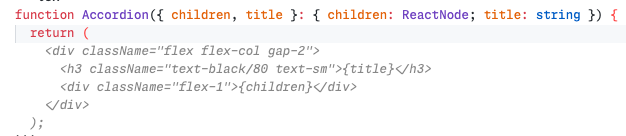 Using clear, descriptive names for your functions and variables helps the copilot understand the purpose and generate more relevant suggestions. Especially when you’ve used this piece of code in other parts of your system.
 -
Know what you’re solving
If you don’t have the solution, so won’t the copilot. Once you’ve outlined the solution the copilot can help you with the implementation. The suggestions you get should not differ too much from what you would’ve written yourself. -
Be less trigger happy
Make sure the copilot suggestions are actually what you want and don’t press tab too early. Tabbing too early will both cause the copilot to think it did well and leave you with poor code quality. At the end of the day, it’s your code. -
Don’t wait too long
Rather than waiting for the copilot to kick in, try to write code until it actually shows up. We’re striving for momentum, so everything that’s interrupting should get thrown out
Be aware
While copilots can be incredibly helpful, there are some potential drawbacks and pitfalls to be aware of:
- Over-reliance
- Accepting lower-quality code
- Lack of understanding
As long as you’re aware of the drawbacks, knock yourself out. I’d take these any day of the week.
Conclusion
- If you’re not using a copilot, try one now. My recommendation is Supermaven
- Make sure you’re the captain, not the copilot
- Know what problem you’re solving
- Keep writing code until it predicts what you have in mind, don’t wait
- If you’re relying too much on it, try a copilot detox
- Guide the copilot with function signatures and declarative names
- Use a fast copilot to avoid the pause
- Use a copilot with a large context window to improve relevance and quality
Next week: Which one should I use?
Next week I’ll compare the various copilots, the pros and cons and find which one brings most value as of now.
You know coding copilots, probably used one. If not: IDE extension that autocompletes code. Sounds (and is) great, with drawbacks. More on those later.
Why would I use a copilot?
I optimize for speed & momentum. Peak productivity: long hours, distraction-free, momentum. Flow state, slow to enter. I adopt tools that keep me in flow longer. Copilots help hugely.
Copilots amplify momentum, make process much faster. That is why I like them. But they amplify momentum in current direction, whatever it is. Great speedup, or frustrating obstacle to “deal” with.
Here: my process for entering flow without copilot distracting.
The copilot pause
You know the “pause.” Moment you wait for AI to write what you think, so you press tab and move on. That is the pause.
Pause is not inherently bad. Brain wiring. Adopting pause should be active choice, not accident. Mitigation below.
Flowing in two directions
Observed online, friends, colleagues: copilot use falls in two buckets:
- Being guided
- Being guiding
Guided
Guided flow: expect copilot to solve problems, wait, get distracted. Easy trap. Brain learns to wait and tab when good enough. Lots of waiting, and lower quality accepted because you waited. Sunk cost fallacy!
I landed here after first weeks. Mesmerised, superstitious.
Guiding
Guiding flow: intuition for how copilot works, when suggestions are best, what input makes it behave. Pause still happens, results much better. Almost magical when it gives exactly code you wanted.
Key: solve problem first, set copilot up to implement your solution. Takes while. Worth it.
How to guide (the copilot)
Unlock for me: copilot both fast and accurate. Tried couple, switched, landed on Supermaven (not affiliated). No looking back (yet).
Large context window, extremely fast completion. Relevant suggestions, fast, momentum up. Noticed pair-programming on friend’s computer with GitHub Copilot. Kept pressing tab, nothing happened…
Things that help:
-
Write descriptive comments around your code
# function used to sort by key in descending orderI rarely do this, still useful. Tools like Cursor are more efficient: prompt directly, no “prompt” in comment.
-
Outline the function signatures
def sort_by_key(key: str, items: List[Dict[str, Any]]) -> List[Dict[str, Any]]:Contracts in program. I do this with or without copilots. Copilot fills body easily.
-
Use expressive, declarative names
function Accordion(Becomes
Clear names tell copilot purpose, give relevant suggestions. Especially when pattern exists elsewhere in your system. -
Know what you’re solving
No solution from you, none from copilot. Solution outlined, copilot implements. Suggestions should match what you would write. -
Be less trigger happy
Check suggestion before tab. Early tab teaches copilot it did well, leaves poor code. Your code, end of day. -
Don’t wait too long
Do not wait for copilot. Write until it shows up. Momentum is goal. Interruptions go out
Be aware
Copilots help hugely. Pitfalls:
- Over-reliance
- Accepting lower-quality code
- Lack of understanding
Aware? Knock yourself out. I take these any day.
Conclusion
- No copilot? Try one now. My pick: Supermaven
- Be captain, not copilot
- Know problem you solve
- Keep writing until it predicts your intent, don’t wait
- Relying too much? Copilot detox
- Guide with function signatures and declarative names
- Fast copilot avoids pause
- Large context window improves relevance and quality
Next week: Which one should I use?
Next week: copilots compared, pros and cons, best value now.